![APCO Holdings Logo_CMYK (002)-1.png]](https://knowledgebase.apcoholdings.com/hs-fs/hubfs/APCO%20Holdings%20Logo_CMYK%20(002)-1.png?height=40&name=APCO%20Holdings%20Logo_CMYK%20(002)-1.png)
These articles serve as a comprehensive guide and quick reference for navigating HubSpot. If you're looking for articles tailored to your specific role, check out the Categories available on the Knowledge Base home page.
Associate parent and child companies
In order to establish new parent-child company relationships, it is necessary to add the appropriate label to the company association.
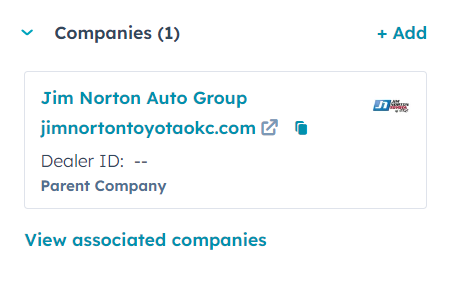
-
Go to CRM > Companies in your HubSpot account.
-
Select the company name you wish to modify.
To Associate a New Parent/Child Company:
-
Click on "+Add" link next to the Companies card.
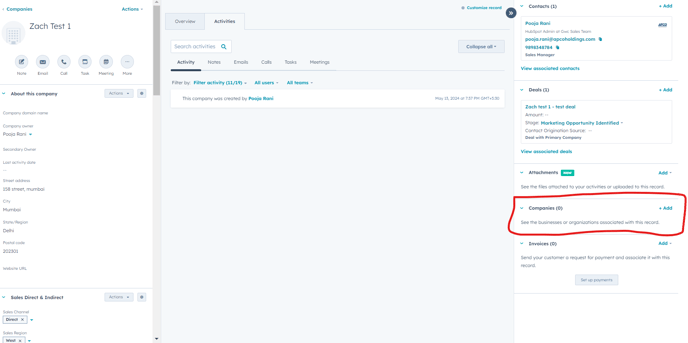
-
Search for the desired company, tick the checkbox, and hit Next.
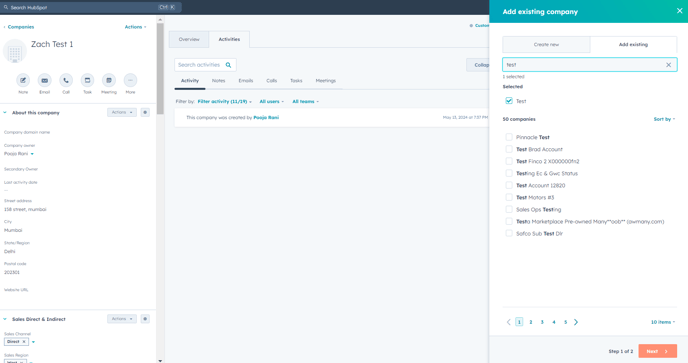
-
Click on "+Add association label" link and pick either Child company or Parent Company from the dropdown.
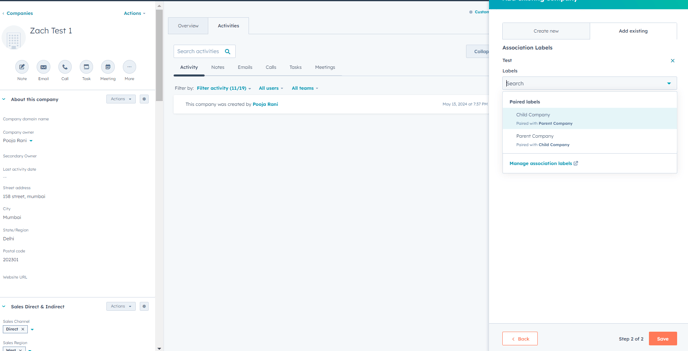
-
Save your changes.
-
To Modify Existing Company Associations:
To set an existing associated company as a parent or child company :
-
From the dropdown, select Edit association labels.
-
In the dialog box, opt for Child Company or Parent Company from the dropdown.
-
Click Update to confirm.
Import to associate child and parent companies in bulk
You can add child companies to parent companies in bulk through an import. The parent companies must already exist in your CRM before you import the child companies.
Get the Record ID or Company domain name values of the existing companies you want to be parent companies. You can find this by searching Record ID/Company domain name on an individual company record, or in bulk by exporting by companies.
- Create an import file containing the child companies.
- In the import file, include a column with the header Parent company. For each row containing a child company, add the Record ID value of their parent company in the Associated company [ID/domain name] column. Include an Association label column containing the value Parent company.
- Import the file.
- On the Map columns in your file to company properties screen:
- In the Associated company ID row, click the Import as column, then select Association. Click the HubSpot property column, then select Record ID/Company domain name.
- Click the Import as column in the Association label row, then select Association label.
- Finish the import. The imported companies will be added to your CRM and will be included as child companies on the parent company records.