![APCO Holdings Logo_CMYK (002)-1.png]](https://knowledgebase.apcoholdings.com/hs-fs/hubfs/APCO%20Holdings%20Logo_CMYK%20(002)-1.png?height=40&name=APCO%20Holdings%20Logo_CMYK%20(002)-1.png)
You can find a more extensive list of SQL scripts on the SQL Scripts and Servers page.
Note: These scripts are meant to be fairly plug and play and simple to use. Typically, you’ll just need to replace one or two pieces of information to get them to return the info you need.
When ‘comment out’ or ‘uncomment’ is mentioned it is remove or adding the ‘--’ before a given line of the script.
Comment Out: Add ‘--’ before a mentioned line.
Uncomment: Removing ‘--’ before a given line.
Example:

This line is commented out. If I wanted to uncomment it, I would remove the ‘--’
Commenting or uncommenting something out will change the color of the text in the script! Something commented out will reflect as entirely green where as something not commented out will typically be a mix of black/blue/red and sometimes green.
The purpose of commenting out or uncommenting lines is to add or remove search parameters from the query.
When a % is included, this indicates a wildcard search. For example, if I’m executing a query on for Galpin and the query includes %Galpin%, this will return results that have any other word before or after the word Galpin.

%Galpin - Searches for any word before + Galpin
Galpin% - Searches for Galpin + any word after
%Galpin% - Searches for any word before or after + Galpin
An * in a query indicates ‘all.'
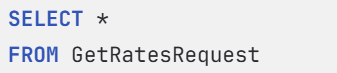
Example: Select * from GetRatesRequest is going to return all columns in the GetRatesRequest table. Using Select top 100 * will only return the top 100 rows of the table and return all columns.
While most of these queries were written for a specific purpose, they can be altered if you need slightly different information than what the SQL script is asking for.
Example: If you wanted to see all the contracts being submitted by Reynolds, you could take the Rate Request By VIN Number script and change ‘where VIN = ‘2HGFE2F54TH514560’’ to ‘where Partner = ‘Reynolds’’

Rate Request by Contract Number
This script will return the Get Rates Request call for a given Contract Number. This can be used to tell what day a dealership made a call to us for rates so that you know what day to look at when trying to obtain the Rating XMLs.
Use: ECO_SQLHA2_PR3
Replace RVE4BE2695 with the contract # you are looking for the request to. Contract # must be within the apostrophes.
--Use SQL_HA_PR1use ECOdeclare @contractNumber varchar(20) = 'RVE4BE2695'select top 100 pp.DateCreated as RateTime, * from Logging.dbo.SubmitContractRequest scrleft join Orchestration.Orchestrator.PricePoint pp on pp.ExternalID = scr.BasePlanCodewhere scr.BaseContractNumber = @contractNumber
Rate Request by VIN Number
This script will return the Get Rates Request call for a given VIN number. This can be used to tell what day a dealership made a call to us for rates so that you know what day to look at when trying to obtain Rating XMLs.
Use: ECO_SQLHA2_PR3
Replace 2HGFE2F54TH514560 with the VIN # you are looking for the request to. VIN # must be within the apostrophes.
use logging
select * from GetRatesRequest where VIN = '2HGFE2F54TH514560'
Performance Points for Inactive Account
This script will tell you what points where logged to a user’s account when their account flipped to inactive status. This list can then be provided to ECO Support to flip them back to an Available Status so they are able to be redeemed.
Use: ECO_SQLHA_PR3
Replace 017992 with the dealer number the user is associated with and 2020-01-01 with the beginning of the date range you are looking for - typically you can start with the first day of the month/year of their last redemption. Both fields must remain with the apostrophes.
Note: This will only return contracts in Inactive status.
use ECRewards
select rp.UserFirstName, rp.UserLastName,  * from sales s
    join ParticipantDealer pd on pd.ID = s.ParticipantDealerID
    join Dealerships d on pd.DealershipsID = d.Id
    join RewardParticipants rp on rp.id = pd.RewardParticipantID
    where d.DealerID = '017992'
    and RewardStatusId = 10
    and SaleDate > '2020-01-01'
    order by SaleDate desc
Hierarchy for ECO Users
This script will give you the Hierarchy path for an ECO account. What we have in our system must match TailLight’s or the user will receive errors.
Use: ECO_SQLHA_PR3
Replace automotive development group - north with either first name, last name, dealership or agency name. Because this query uses a WildCard search around the name, it’s okay to be more vague with your search terms - just make sure you are looking at the right information when it returns!
If you’re searching for John Smith and you use ‘%John%’ in your query, you’re going to get a lot of results!
use ECO
select top 10 * from general.RistkenHierarchyPaths
where nodepath like ('%automotive development group - north%')
Voided Contract Info
This script will give you the username of who voided the contract provided that it was voided in ECO. GWC Dealer Portal does not pass this information nor can we capture it if the contract was voided through a Menu Provider.
Use: ECO_SQLHA2_PR3
Replace EGT5A9E256 with the contract number that you are looking up. The contract # much remain with the apostrophes.
use logging
declare @contractnumber varchar(20) = 'EGT5A9E256'
select BaseContractNumber, CustomProperties, partner, TransactionAction, DealerCode, RequestDateTime
from SubmitContractRequest
where BaseContractNumber = @contractNumber
order by RequestDateTime desc
Performance Points By Dealer and Status
This script can be used as an alternative to the clunkier reporting functions within the Performance Points site. This will return all contracts logged to a dealer, the FI user they are logged to, and their statuses within a given date range.
Note: This is mainly used to provide Sheehy stores their YTD PP sales at the end of the year. A pivot table can be created with the breakdown once the results are pulled into Excel.
Use: ECO_SQLHA2_PR3
Replace 020078 with the dealership you are needing the performance points breakdown for.
You can run this query on multiple dealerships at a time!
To do that, uncomment out the 018658 line and replace that dealer number with your second dealer. If more dealerships than two are needed in the query, follow the pattern for the first two of ('DEALERNUMBER'),
Leave the comma off after the final dealer.
Replace 2021-01-01 with the start of your date range and ‘2021-12-31’ with the end of your date range.
All dealer numbers must remain with in the parentheses and apostrophes.
All date ranges must remain within the apostrophes.
--select * from Dealerships where name like '%shee%'use ECRewardsdeclare @dealerCodeToCheck table( DealerCode varchar(10))insert into @dealerCodeToCheck values ('020078'), -- ('018658')select rp.UserFirstName, rp.UserLastName, ContractID, SaleDate, rs.Description, DealerCode, vin, * from Sales s join ParticipantDealer pd on pd.ID = s.ParticipantDealerID join Dealerships d on d.id = pd.DealershipsID join @dealerCodeToCheck dc on dc.DealerCode = d.DealerID join RewardStatuses rs on rs.Id = s.RewardStatusId join RewardParticipants rp on rp.Id = pd.RewardParticipantID where SaleDate between '2021-01-01' and '2021-12-31'
Username of Who Remitted a Contract
This script is used to find out which dealership employee remitted a contract. This only works for contracts that were remitted in an APCO site. That said, this will usually also tell you if the contract was remitted through a Menu and if so which Menu that was.
Use: ECO_SQLHA_PR3
Replace VSCEB7424808 with the contract number you are looking up. The contract # must remain within the apostrophes.
use Orchestration
select top 10 SubmittedByEmailAddress,* from [Orchestrator].[RemittanceDetail] rd
    join Orchestrator.ContractReferenceCode crc on crc.ID = rd.ContractReferenceCodeID
    join Orchestrator.Remittance r on r.id = rd.RemittanceID
    where crc.Value in ('VSCEB7424808')
Contract Requests By VIN/Contract #
This script is used to find some quick contract details without pulling the XMLs. This will tell you the coverage selected, any surcharges included, customer/vehicle/lender information, submit date and more.
Note: This is not a replacement for pulling XMLs! This is just a brief overview of the contract that was created.
Use: ECO_SQLHA_PR3
Replace 1N4AL3AP4GN330753 with the VIN you are looking for the contract information for.
If you want to search by contract number instead, comment out VIN = '1N4AL3AP4GN330753' and uncomment --BaseContractID = 'EGT1D069H2'
Replace EGT1D069H2 with the contract # you want to look up.
VIN or Contract Number must remain within the apostrophes.
VSC Sales By Dealer With Costs
This script is used to pull a list of contracts a dealer sold from a specific sale date to current day that are not in a voided or remit status. It also includes dealer cost.
Use: APCO_EDW_PR1
Replace A019426 with the dealer number you want the contract list for.
Note: This query runs from the PCRS database. The A prefix must be included for this to work properly!
Replace 12-31-2022 with the beginning of your date range. EX - if you want all contracts from 1/1/2025 until today, you’d enter Jan 1, 2025
If you want ALL contracts returned and not just VSC Comment Out the follow: and cg.sGroupDesc like '%vsc%'
--apco_edw_pr1 server
use pcmi_warranty_custom_apco
select dlr.sSellerNumber, c.sContractNumber, c.cDealerCost, c.cRetailRate, cg.sGroupDesc, c.dtContractSale, veh.sVinNumber, c.sContractStatus from dbo.Contracts c
join dbo.EntitySellers dlr on c.iparentID = dlr.iid
join dbo.CoveragePlans cov on cov.iId = c.iCoverageId
join dbo.CoverageGroups cg on cg.iId = cov.iCoverageGroupId
join dbo.ContractVehicle veh on veh.iContractId = c.iId
where dlr.sSellerNumber = 'a019426'
and c.dtcontractsale > '12-31-2022'
and cg.sGroupDesc like '%vsc%'
and c.sContractStatus not in ('v', 'r')
order by c.dtcontractsale desc